Monday, December 23, 2013

Aircraft Appraisals

Hi there.

First of all, this is my first post after two years. I am not gonna post something about flight data recorder as my previous post. Instead, I would like to share with you, another interesting topic in airline industry.

Many aviation-related-companies in this world offer an aircraft valuation services. For a specific condition of aircraft and in a particular time reference, they would provide you with -let me say an opinion from certified person about what the dollar value of your aircraft(s) should be, in worldwide market.

Few of many prominent non-profit community that provide certification for aircraft appraisals are International Society of Transport Aircraft Trading and Institute of Business Appraisers. And as far as i know, company such as AscendIBA, and Morten Beyer and Agnew Appraisals have at least one of their employee certified from one of these institutions.

An opinion from certified appraisers is of course a very important reference for insurance broker and aircraft owner. Insurance broker calculates what amount of risk premium that airline shall bear to insure the aircraft. This premium is basically depend on the aircraft value. An aircraft owner use the opinion to determine how much dollar money shall the airline (who operates his/her aircraft) pay to him/her should there is total loss involving the aircraft.

Okay, I am gonna stop the introduction. What I am gonna share with you is a -well, at least based on my experiences, method and formula on how to fairly calculate an aircraft value. In this example, I would like to value an Boeing 737 aircraft in its middle age of economic life (had done airframe and engine heavy maintenance). Let us assume that this aircraft is under MSG-2 block-check maintenance.

Valuation would be divided into two main parts. First, calculation of a so called adjusted value due to maintenance status. A non certified person could do this step. Second, final calculation involving an economic-based estimation of aircraft and engine half-life value which should only be done by certified and experienced person or entity.

Adjusted valuation due to maintenance status of an aircraft would require the following cost information:
  1. Last D-Check date, time since Last D-Check, and its maintenance interval
  2. Last landing gear overhaul date, time since last overhaul, and its maintenance interval
  3. Last engine refurbishment date, time since last refurbishment, and its shop-visit interval estimate
  4. Last LLP replacement date (for each LLP module), time since last replacement, and its replacement interval
  5. Last APU overhaul date, time since last overhaul, and its shop-visit interval estimate
In addition, one would also need the following aircraft and engine maintenance status:
  1. Total cost of D-Check
  2. Landing gear overhaul cost
  3. Engine refurbishment cost (refurbishment to engine full EGT margin)
  4. Engine LLP replacement cost
  5. APU Overhaul cost
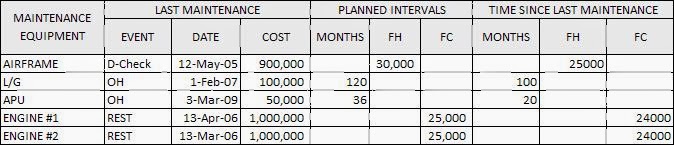
Maintenance status and cost information. Numbers are for illustrative only.

Engine LLP status and cost information. Numbers are for illustrative only.

From the first table above, the airframe last D-Check was on March 2005 and it costs $900,000. Aircraft flight hours was used as timer for this D-Check maintenance and its interval is 30,000 flight hours and until the calculation was prepared, the aircraft had been flying for 25,000 flight hours. The landing gear was overhauled on January 2007 and it costs $100,000. The interval is 120 calendar months and had been used for 100 months.

APU was overhauled on  February 2009 and costs $50,000. The interval was estimated for 36 months and had been used for 20 months. Two engines was refurbished concurrently on May 2006 and cost $1,000,000 for each engine. The interval was estimated for 25,000 flight cycle and had been used for 24,000. The second table was used to calculate adjustment value for LLP of engines.

If you observe the usage of the parts mentioned above, you may notice that most of the maintenance had been 'used' by more than half of its economic life, except the D-Check which still have 25,000 of 30,000 flight hours remains. This lead us to an assumption that the adjusted value would be relatively low compared to its full maintenance value.

Now, for the formula. The adjusted value for each parts should be a fraction of its remaining maintenance value to its full maintenance value, multiplied by maintenance cost, i.e.:

AV = (0.5 - (Time Since Last Mtx / Mtx Interval)) * Mtx Cost

Formula above was self-explanatory. If the aircraft was fresh from D-Check, then time since last maintenance would zero and its adjusted value would be equal to half of its maintenance cost. Or if the engine EGT margin would go negative in a few days of flight, then its maintenance fraction would be almost equal to minus zero point five (for example: 0.5 - 24,990/25,000) and makes it trash of aluminium!

Using the two tables above and calculating the adjusted value by formula already mentioned, then one would arrive at -$545,800 of adjusted value. This negative dollar value had been guessed earlier, as most of parts had been used for more than half of its economic life. For clarity, I share your my excel calculation here.

Now that the adjusted value obtained, the final step is required. A good definition of half-life value of an aircraft is given by ISTAT,

'Half-life' condition assumes that every component or maintenance service which has a prescribed interval that determines its service life, overhaul interval or interval between maintenance services, is at a condition which is one-half of the total interval.

In general, half-life value of an aircraft was dependent on aircraft age, aircraft type, and aircraft maximum take-off weight. Assuming that one of those certified appraiser state that half-life value of the Boeing 737 aircraft with its age and characteristic is $5,000,000, then our final aircraft value would be $5,000,000 + (-$545,800) or equal to $4,454,200. End.

Dear readers, I would be very much thankful should you have time to give me feedback on my thoughts or would like to drop any comments. See you on another interesting topic on aviation.

Thursday, June 16, 2011

FDR Readout Free For Public

hi there.

It's been about a month since the first post on FDR readout using Matlab. Now, allow me to show and to give you the application. I called it aPENGAMAT. In Bahasa Indonesia, this is Analisis Penerbangan dan Keselamatan. In English, it could be Flight Safety Analysis. Yes I know, the name of the software is quite a big deal while this initial release is no more than a very simple readout process. I have a dream (well, only a dream for now) that this software could also be used as a real flight safety analysis such as AirFASE. In fact, software routines are basically mimicking AirFASE. OK, let me introduce you. And at the end of this article, I'll give you the software ;)

Since this is based on Matlab 2008a Engine, you will need to instal Matlab Compiler Runtime (MCR 7.8). It's funny enough that I could not find download page in Mathworks site!
Edited: It seemed Mathworks would not allow any public reference for downloading it. You may need to purchase a Matlab license to obtain MCR included. Thank you Sumandari for MCR Installer link.
If you click the executable file, the main windows would be like this.
Just like the AirFASE routine goes on, there will be 1+3 simple step to be able to read FDR file. At first, you will need to setup -a so called dataframe layout that is customized for each aircraft. Ask for it to airline or manufacturer of the aircraft. May be you are wondering now, what is the dataframe layout? Well, you can read a general explanation here and here. If you have access and/or capability, just go to ARINC site and purchase ARINC 717 specification document. It will cost you a couple hundreds US dollars ;)

But let me give you one quick example what is the dataframe layout and how to define a flight parameter conversion into database. Let me pick a parameter called HEADING ATTITUDE. An aircraft's heading is the direction that the aircraft's nose is pointing. It is referenced by using either the magnetic compass or heading indicator, two instruments that most aircraft have as standard. Using standard instrumentation, it is in reference to the local magnetic north direction. True heading is in relation to the lines of meridian (north-south lines). The units are degrees from north in a clockwise direction. East is 90, south is 180 and west is 270 degrees. Operational range would then be from 0 degree to 360 degree.

Now, from a dataframe layout document, it is stated that the HEADING PARAMETER is stored in word 28, all subframes (1-4), and taking up 10 of 12 bits, ie: bit 3 (LSB) to bit 12 (MSB). See picture below. This parameter location is marked blue.

Now, the conversion function from raw data into engineering unit would be:
EU(DEGREE) = operational_range/bit_len^2 * RAW(DECIMAL)
From the figure above,
RAW = 1111100100 (BINARY) = 996 (DECIMAL)
Knowing the operational_range is 360 degree and bit_len is 10, the engineering unit would be:
HEADING (DEGREE) = 360/10^2 * 996
HEADING (DEGREE) = 0.08 * 996
HEADING = 350.156 DEGREE
This generic rule also valid for some flight parameters, such as pitch and roll attitude. Read the rest of the aircraft dataframe layout document. Now, we are ready to input it into DFL database. See figure below.


To be able to decode the FDR file, this program will try to communicate with dataframe layout database. And since I only have knowledge on Microsoft Access, we will keep in-touch with this closed-source software. To connect aPENGAMAT with Access database, open your Control Panel -> Administrative Tools -> Data Source (ODBC). Obviously, it is for Windows only.
Click "Add" to create new data source -> choose "Microsoft Access Driver (*.mdb,*.accdb)" -> click "Finish".

In "Data Source Name", type DFL. It must only be DFL though. In Database group click "Select...". Now, select DFL.accdb (this file is given. scroll trough the end of this article to download). Click "OK." Now, our dataframe layout database is already registered to Windows. Well done!

Now, we need to build m-file dataframe layout. From main window, click "Build DFL". Depending on your dataframe layout database, a input dialog will appear.

Choose a related dataframe that you want to use to read the FDR file. Then, we need to build -a so called intermediate file. This is no more than a mat file which is already structured in frame-subframe-word as specified in ARINC 717. Click "Build Intermediate" to proceed.

OK. Now, take a look at "Word: 64". It is the value of word per second that is effective to FDR file. Other value would be 128, 256 and 512 wps. Recent Boeing aircraft such as Lion Air B737-900ER with a tail number PK-LHM has used the latter value.

For "Posisi Baca", selecting EoF will read the FDR file starting from the end of file. Otherwise, selecting BoF will read the FDR file starting from the beginning of the file. For "Panjang Bacaan", set the value of "Jam" for hour and "Menit" for minute. Typical single flight would be an hour -or 60 minutes. Here, we are now ready to create intermediate file. Click "Open Raw".
For example, there are two ARINC 717 compatible file with extension of ddf. Selecting one of the files would get you back to Interm window. Now click "Create Interm". Program will now creating the intermediate file. Just wait untill a save window appears. Set the filename and click "Save". Well done!

Step two. From the interm_file.mat which contains ARINC 717-structured data, the program need to build -a so called result file, which also is a mat file that is already contain parameters value in engineering unit (for example, Pressure Altitude in Feet, IAS in Knot, Autopilot status in ON/OFF, and so on). On the main window, click "Build Result".

We are now asked for intermediate file that we had previously created. Open it. Then, a second window is asking us to select a dataframe layout file in mat extension.

Program will now converting the specified raw data into a more usefull information by using specified dataframe layout.


Now, result file had been created. To show result, click "Plot Result".

Go to Option -> Load and select the recently created result file. And there you go, program will try to show all active parameters. Change pop-up menu to show other parameters.

If you want to print these four subplot together, go to Option -> Print. It will be saved to where aPENGAMAT executable file is located.

Now, as my promise, I will give you the files. Here is for dataframe layout access database and here is for the aPENGAMAT executable file. Should you have discussion, please contact me.

Update Log:
23 August 2011,
  1. Redesigned: result file restructured to adapt event finder logic. You can also use this file to show flight parameter into Baca Window.
  2. Access database restructured.
  3. Added: zoom capabilities.
  1. Added: Find Events button. Note: Still struggling coding for the logic ;) 
11 August 2011,
  1. Solved: Cannot collect parameter with more than 1Hz sampling rate
  2. Note: I am currently working to add event exceedance detection feature between my idle work hours. Be patient ;) 
19 July 2011,
  1. Plot Result Figures (Baca Window) can now be zoomed simultaneously.
13 July 2011,
  1. Intermediate process now runs twice faster!
  2. Teledyne and Hamilton synchronizatation type now available.
  3. 64 and 128 wps file can now be read.